
The Travel Rule explained
Australia's anti money laundering laws have changed. One of the new rules is called the Travel Rule, and it changes a few things about sending and receiving Bitcoin in AmberApp.
These changes are rolling out in Amber, starting on September 1st.
You'll need the latest version of the AmberApp. These changes need it, and on an older version some bitcoin sends and receives may not go through. Please update from the App Store or Google Play.
Here's what it is, why it exists, and what it means for you.
What the Travel Rule is
Think about sending money from your bank account. Your name and account details go along with the payment, so the bank at the other end knows who sent it.
The Travel Rule brings that same idea to Bitcoin. When a regulated business like Amber sends or receives Bitcoin for you, we have to collect some information about who's involved. Sometimes we have to pass that information on to the business at the other end.
In Australia, AUSTRAC is the financial crime regulator, and it's AUSTRAC that sets these requirements. They started on 1 July 2026 and they apply to every regulated Bitcoin business in the country, not just us.
Two things people often assume, and get wrong.
There's no minimum. The rule applies to a $20 transfer just as much as a $20,000 one.
It isn't only about exchanges. It also covers Bitcoin you send to, or receive from, a wallet you hold yourself.
Why it's happening
The Travel Rule is part of Australia's anti money laundering and counter terrorism financing laws. The idea is that if information about who's sending and receiving money is available to the businesses handling it, the whole system gets harder for criminals to use.
Australia is following a global standard set by the Financial Action Task Force, an international body that makes recommendations on fighting financial crime. Most countries are bringing in something similar.
We didn't ask for these requirements and we can't opt out of them. What we can do is make them as light as possible for you.
What's changing in AmberApp
Sending Bitcoin
On-chain sends. Sending Bitcoin works the same way it always has, right up to the moment you tap confirm. After that we run a quick check before your Bitcoin goes out. Most sends pass in seconds.
Sometimes a send will tell you we're checking it. That means it's with us and there's nothing for you to do. Your Bitcoin hasn't left your wallet, and you'll see the status change in your transaction history once the check is finished. Very occasionally we can't complete a send. If that happens we'll say so, your balance stays exactly as it was, and our support team can help from there.

Lightning Network sends. The first time you send to a new Lightning wallet, we'll ask one question: is this wallet your own? Confirm once and we'll remember it, so we won't ask again next time.
Lightning sends work to wallets you hold yourself and to other Amber accounts, those using a Lightning address ending in @amber.app. They don't work to exchanges, or to wallets a company holds for you. To send Bitcoin to an exchange, send it on-chain instead.

Vault withdrawals. A Vault withdrawal is a Bitcoin send underneath, with a lot more security around it. It's time-locked, and every withdrawal gets extra checks before it goes anywhere.
When you withdraw, you choose where it goes. To your own Bitcoin Wallet in the app, nothing changes, because that wallet is yours and we already know it. To an external address, the same checks as an on-chain send apply.

Receiving Bitcoin
Receiving on-chain. Receiving Bitcoin works exactly as it always has. Your Bitcoin address appears straight away just like you're used to, and deposits from other exchanges are still accepted.
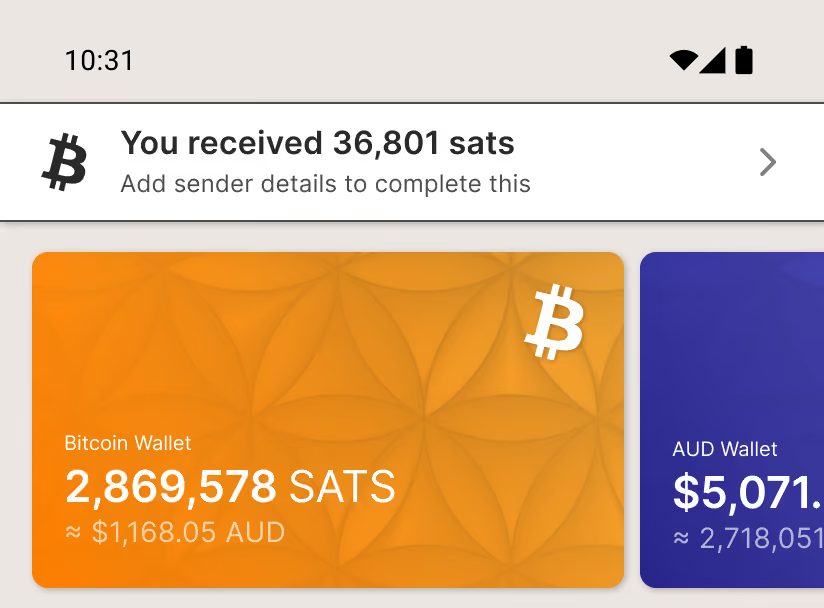
The new part comes after the Bitcoin lands. A banner on your home screen will tell you it's arrived, and that we need sender details before it can complete.
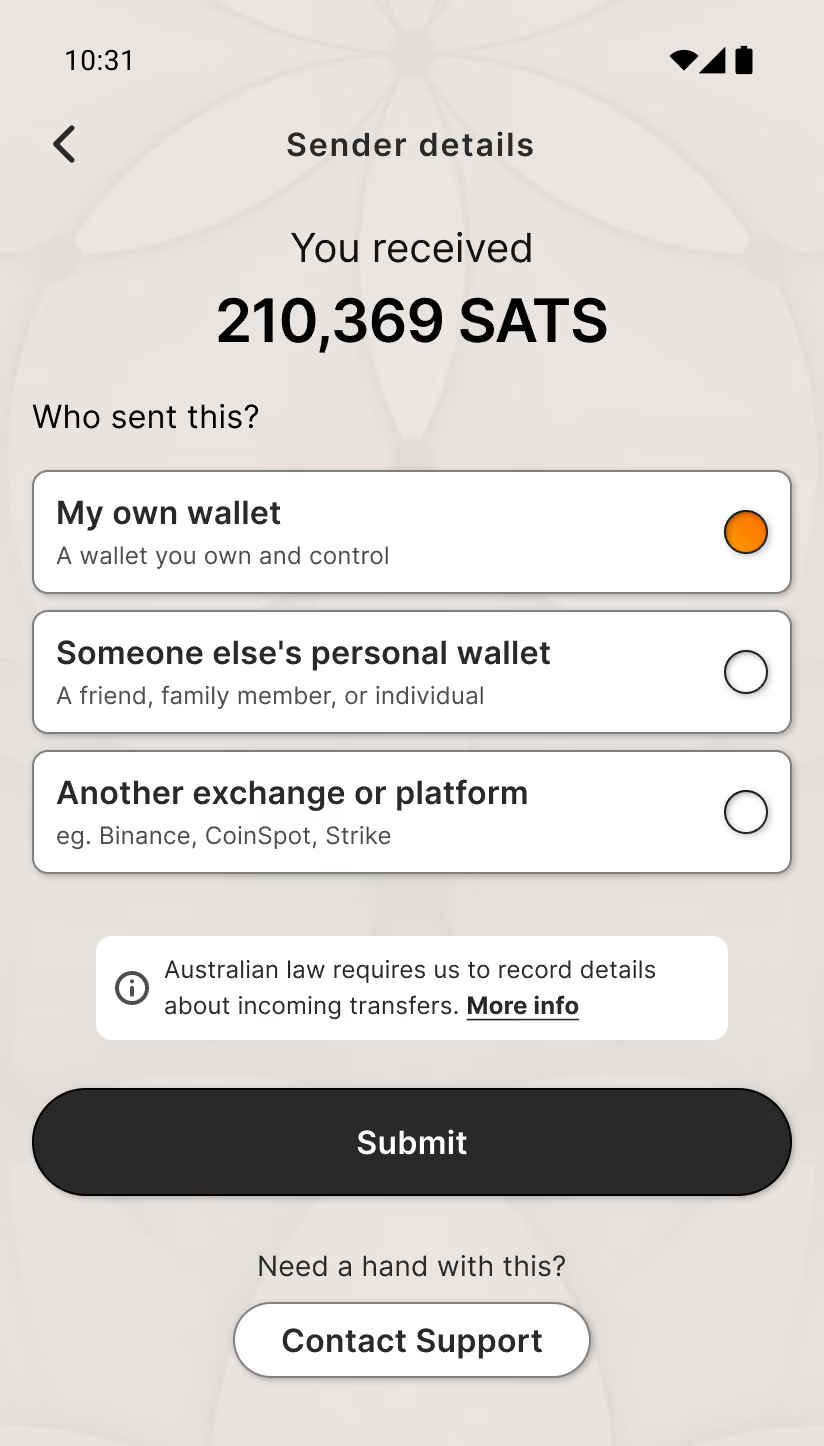
You pick one of three answers: your own wallet, someone else's wallet, or an exchange. If it came from a person we'll ask their name. If it came from an exchange you'll pick it from a list. It takes a few seconds.
The transaction may sit in review briefly while we finish a check, then it completes as normal.
Receiving over Lightning. Lightning payments need to come from a wallet you hold yourself, or from another Amber account. The first time you go to receive over Lightning, we'll ask you to confirm that.
If the Bitcoin is coming from an exchange, use your Bitcoin address instead. That still accepts exchange deposits without any trouble.
Once a Lightning payment arrives, we'll ask who sent it, the same as an on-chain receive.

Changes to your transaction history
Two new labels will start showing up on your transactions.
Action needed means we need something from you before it can finish, usually the details of who sent you Bitcoin. Tap the transaction and it'll take you to what's needed.
In review means it's with us. There's nothing for you to do and we'll update it when we're done.
Both sit at the top of your transaction list. You can tap any transaction to see where it's up to, and if something is taking longer than you'd expect, get in touch and we'll tell you where it stands.

What isn't changing
Buying and selling Bitcoin. Your recurring buys, automations and Vault all work exactly as they do today.
Moving Bitcoin between your own Amber accounts, including from your Vault to your own Bitcoin Wallet.
And self-custody. Your keys are yours, and moving Bitcoin to your own wallet works exactly as it always has. If you move Bitcoin between two wallets you hold yourself, with no business in the middle, the Travel Rule doesn't apply at all.